
Livewire Trade Panel

Welcome to the
Livewire Trade Panel
Beta Test!
You’re In - Your trading advantage begins here!
You’re officially in the Beta Test group, which means you’re getting early access before everyone else — and helping us build something strong.
It’s all here: Product download, user guide, videos, customer support, and more!
💬 Start Here:
• Get It Now → Livewire Trade Panel Beta 1.0 (Don’t forget to use your exclusive coupon code to lock in lifetime access for just $1.00!) → [Beta Test Version Update - Cody]
• Quick Start → User Guide PDF
• Watch → Livewire Trade Panel in Action → [Video Link - Kelly]
• Questions? → Livewire Beta Testers Channel
You have 14 days to test-drive the full Livewire Trade Panel — and see how it fits your trading style. If you have feedback, get stuck or have questions, jump into our Livewire Beta Testers Channel — we’ve got you.
We're looking forward to your feedback — your insights will help us fine-tune and improve the Livewire Trade Panel experience - we really appreciate you.
Let's Trade Smarter!
Kelly Ann
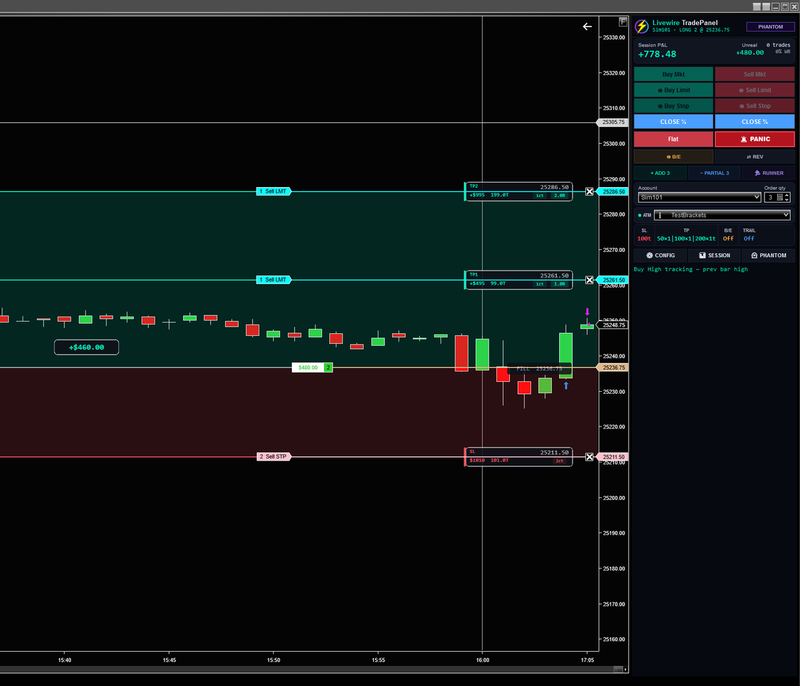
Livewire Trade Panel is a professional trade execution panel for NinjaTrader 8 that replaces NinjaTrader's Chart Trader with something built for serious execution. Livewire Trade Panel gives you one-click entries across six order types, draggable TP/SL brackets, percentage-based partials, and advanced position management — all from a single panel. The Kill Switch enforces daily discipline with profit targets, loss limits, and tilt detection backed by animated full-chart banners. When you're done for the day, Phantom Mode keeps you sharp — trade live markets with zero risk, full bracket simulation, and real-time P&L tracking. Every real order path is blocked. Streamer-friendly. Built for futures.
Core Trading
- One-click execution — Buy Mkt, Sell Mkt, Buy Ask, Sell Ask, Buy Bid, Sell Bid
- Full ATM integration — all bracket types supported including multi-target templates
- Buy High / Sell Low — automated stop entries at previous bar high/low that trail each bar, with full ATM bracket placement on fill
- Multi-bracket support — renders all TP levels individually with per-bracket contract count, dollar amounts, and R:R

Position Management

- Flatten — cancels all working orders + market closes position Panic — always-enabled emergency flatten regardless of panel state
- Breakeven — moves stop to entry +1 tick
- Reverse — closes current position and enters opposite direction with ATM
- Partial — closes contracts from bracket 1 first, redistributes remaining across targets
- Runner — closes all but 1 contract, moves stop to BE+2, keeps furthest target
- Scale In — adds contracts with a new ATM bracket set
On-Chart Visualization
- Hover preview — shows all bracket levels with shaded TP/SL zones, dollar amounts, and R:R before you click
- Live bracket rendering — dashed TP/SL lines with pill labels showing price, dollars, and contract count
- Floating P&L box — centered on chart between entry and current price, includes partial realized from bracket fills
- Shaded zones — green TP zone and red SL zone visible during trade (toggleable in config)
- Kill switch banner — full-width on-chart warning when session is killed

Session Analytics

- Real-time P&L — tracks session realized + unrealized including ATM partial fills
- Trade count and win rate — updated instantly on each trade close
- Equity curve — visual session performance chart
- Hourly P&L breakdown — identifies best and worst trading hours
- Session-generated insights — pattern detection across session data
Risk Management
- Kill Switch — auto-flattens on profit target, loss limit, max trades, or consecutive losses. Active every tick.
- Stop Loss Safety Net — verifies a stop order exists every ~2 seconds. Emergency flattens after 3 consecutive failures (~6 seconds with no stop detected).
- Time Filter — restricts entries to configurable session window

Account & Configuration

- Native account isolation — reads Chart Trader's account selector. Each chart operates independently.
- Bidirectional account sync — change account in our dropdown or NT8's native selector, both stay in sync
- ATM auto-sizing — qty spinner auto-sets to ATM template total, user can override (extra contracts go to bracket 1)
- Streamer mode — masks all P&L, trade counts, and financial data with dots
- Persistent config — all settings saved per-user and restored on restart
- Session persistence — P&L and trade history survive instrument switches
Download Now → Livewire Trade Panel Beta 1.0
Livewire Trade Panel
Livewire Trade Panel is a professional trade execution panel for NinjaTrader 8 that replaces NinjaTrader's Chart Trader with something built for serious execution. Livewire Trade Panel gives you one-click entries across six order types, draggable TP/SL brackets, percentage-based partials, and advanced position management — all from a single panel. The Kill Switch enforces daily discipline with profit targets, loss limits, and tilt detection backed by animated full-chart banners. When you're done for the day, Phantom Mode keeps you sharp — trade live markets with zero risk, full bracket simulation, and real-time P&L tracking. Every real order path is blocked. Streamer-friendly. Built for futures.
